Fast • Secure • Beautiful
Open Source

Share Files in Seconds

A premium command-line tool for instant file uploads. Beautiful terminal UI, automatic clipboard integration, and seamless sharing.

📁 Gofile
💾 Pixeldrain
PowerShell
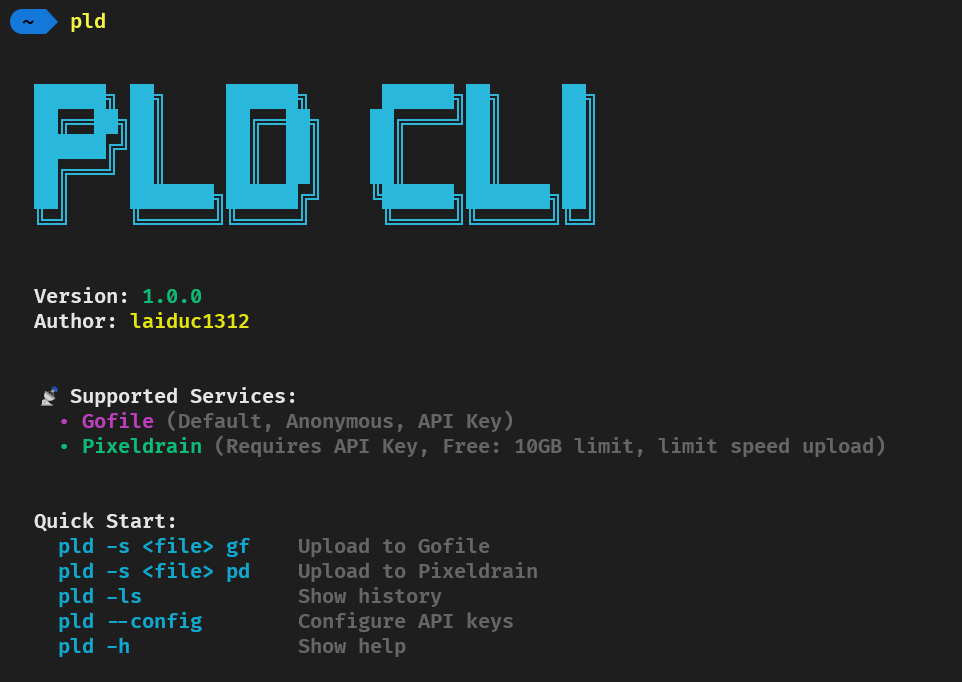
PLD CLI Banner

Quick Installation

Get started in seconds

📋

Requirements

📦
Node.js (v14 or higher)
Required for manual installation. Auto-installed via Scoop method.
🔧
Git
Required for cloning repository. Auto-installed via Scoop method.
💻
Windows PowerShell
Pre-installed on Windows 7 and later.
⚡

One-Line Install (Recommended)

Fastest way to get started

Copy and run in PowerShell:

irm https://raw.githubusercontent.com/laiduc1312209/pld-cli/main/install.ps1 | iex

✨ This will automatically install all dependencies (Scoop, Git, Node.js) if needed.

🪣

Scoop

Windows package manager

Copy and run in PowerShell:

# Step 1: Set execution policy (if Scoop not installed) Set-ExecutionPolicy -ExecutionPolicy RemoteSigned -Scope CurrentUser # Step 2: Install Scoop (if not installed) Invoke-RestMethod -Uri https://get.scoop.sh | Invoke-Expression # Step 3: Install git (required for adding buckets) scoop install git # Step 4: Add PLD bucket scoop bucket add pld-bucket https://github.com/laiduc1312209/scoop-bucket # Step 5: Install PLD CLI scoop install pld-cli
📥

Manual Install

Clone from GitHub

Requires: Node.js & Git

git clone https://github.com/laiduc1312209/pld-cli.git cd pld-cli npm install npm link
0

Install Scoop (if not installed)

Run in PowerShell:

Set-ExecutionPolicy -ExecutionPolicy RemoteSigned -Scope CurrentUser

Then:

Invoke-RestMethod -Uri https://get.scoop.sh | Invoke-Expression
1

Install PLD CLI

Choose your preferred method above

2

Configure API Key

Run pld --config to set up

3

Start Sharing

Upload files with pld -s <file>

Powerful Features

Everything you need for seamless file sharing

⚡

Lightning Fast

Upload files instantly with streaming support for large files. Real-time progress tracking and speed monitoring.

🎨

Beautiful UI

Gorgeous terminal interface with colors, animations, and smooth progress indicators that make uploads enjoyable.

�

Auto Clipboard

Download links automatically copied to your clipboard. Just paste and share instantly anywhere.

📊

Upload History

Track all your uploads with timestamps, file sizes, and download links. Never lose a shared file again.

🔐

Secure & Private

API keys stored locally and encrypted. All uploads use HTTPS. Your privacy is our priority.

💾

Memory Efficient

Handles files of any size without consuming excessive memory. Stream processing ensures smooth performance.

🔄

Dual Service Support

Choose between Gofile and Pixeldrain for uploads. Switch services easily with simple flags. Both platforms supported.

💻

Open Source

Free and open-source software. Contribute, customize, and build upon it. Community-driven development on GitHub.

Simple Usage

Powerful commands, intuitive interface

$ pld --config

Configure your Pixeldrain or Gofile API key

$ pld -s document.pdf

Upload a file to Gofile (default)

$ pld -s photo.jpg pd

Upload a file to Pixeldrain specifically

$ pld --list

View your upload history

Ready to Share Files Effortlessly?

Join users who've made file sharing simple and beautiful